This WEB page comes from the busTRACE 7.0 User's Manual. (Table of Contents)
 This web page refers to our older busTRACE 7.0 which is no longer shipping. Click here for details on our latest generation busTRACE software.
This WEB page comes from the busTRACE 7.0 User's Manual. (Table of Contents)
  |
|
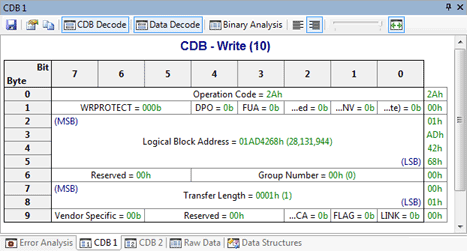
CDB is an acronym for Command Descriptor Block. CDBs are used to send commands to storage class devices (e.g. hard drive, CD/DVD drive, tape drive, etc.). Because of this, the CDB 1 and CDB 2 windows will ONLY show you data for storage class I/O activity. These windows will not display any information if you are analyzing low-level USB activity (i.e. USB Request Blocks / URBs).
Please review our CDB Decoding Options section for details on the available toolbar buttons. You may be wondering why there are two CDB windows, CDB 1 and CDB 2. These windows show the EXACT same decoded CDB. Why have it appear twice then? Although CDB 1 and CDB 2 both show you the same decoded CDB, you can configure each one independently. For example, perhaps you want CDB 1 to show you only the data decoded and no CDB decoded. You might want CDB 2 to do the opposite and show you only the CDB decoded and no data decoded. The choice is up to you. See Also: |
|